Jacob Richman's Training Resources
Tips to Free Up Phone Storage
Rev: 10/2025

|
Phone Storage Problems One morning, when you try to take a photo or film a video or just open an application like Whatsapp, you get a message on your phone that there is "insufficient storage available" or "memory full" or "messages full". In fact, you discover that most of your applications have been working slowly or are not working at all. Backups that usually run automatically at set hours, are no longer working (and you are not aware they stopped). If you never did a cleanup or housekeeping of your phone, you should sit down and start before your phone runs out of storage space. Besides applications that work slowly or do not work at all, one day your phone may not be able to start up. If this is the first time you are cleaning, expect to spend a few hours to review apps, videos, images, etc. After the first time, a few minutes every month will keep your phone (and you) in good health. You should aim to keep 10-15% of your phone's storage free. Have a minimum of 500 MB to 1 GB, to ensure smooth performance. This space allows for temporary files, app updates, and system operations like caching and swap files. |
|
The following tips work on the Android operating system. The tips were checked on my Galaxy A25 Smartphone with Android 15 and User Interface (UI) 7. The screen captures may look slightly different on your version of Android. You can view your phone model at: Settings --> About Phone FYI: The setting Icon is an image of a gear  If you cannot find the setting icon on your home screen, the setting icon is also located on the top right of the Quick Panel / Quick settings . Swipe down from the right top of your screen to open the Quick Panel. This panel also has Wifi, airport mode, flashlight functions. 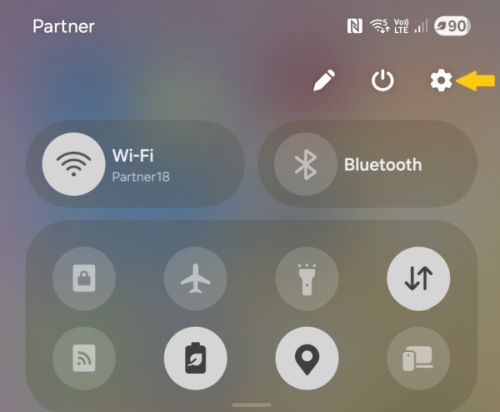
You can view your User Interface (UI) and Android versions at: Settings --> About Phone --> Software Information There is a "Geting Started" Guide to your phone under: Settings --> User Guide The page links to a website with a list of online topics. Looks good, but I prefer having a full manual as a PDF
to read on my computer versus reading online on my phone. |
Tips to Free Up Phone Storage1. Check your phone's storage stats Settings --> Device Care --> Storage (click on the "storage" word to open manage storage) 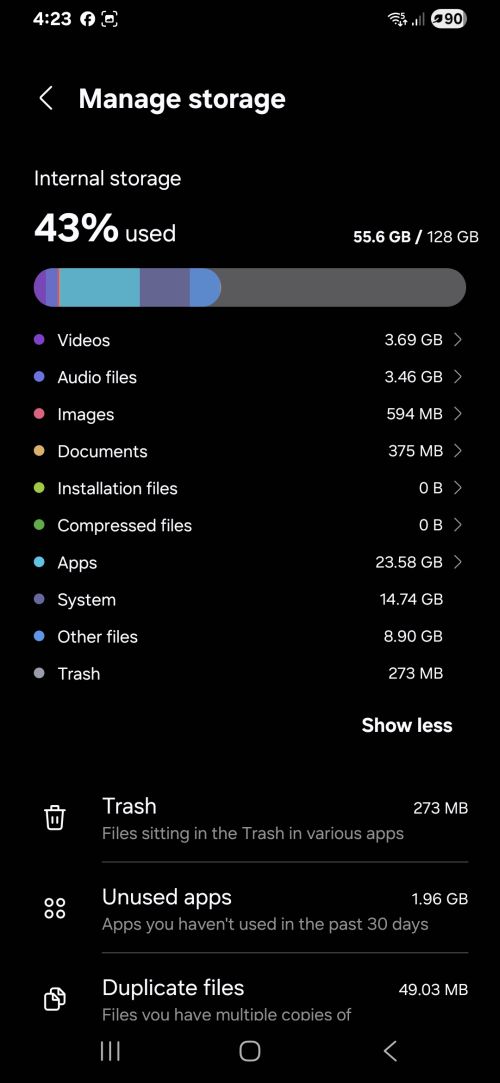 Press on any of the topics to get more details 2. Uninstall unused apps Remove apps you don't use anymore. |
|
3. Clear app caches Clearing cache removes temporary data and files that build up over time without deleting your important data. Settings --> Apps -- > select an app --> then go to Storage Tap Clear Cache. Repeat this for several apps. Do Not click on clear data. I discovered my "Chrome" app cache takes up 1.79 gigabytes of storage space. 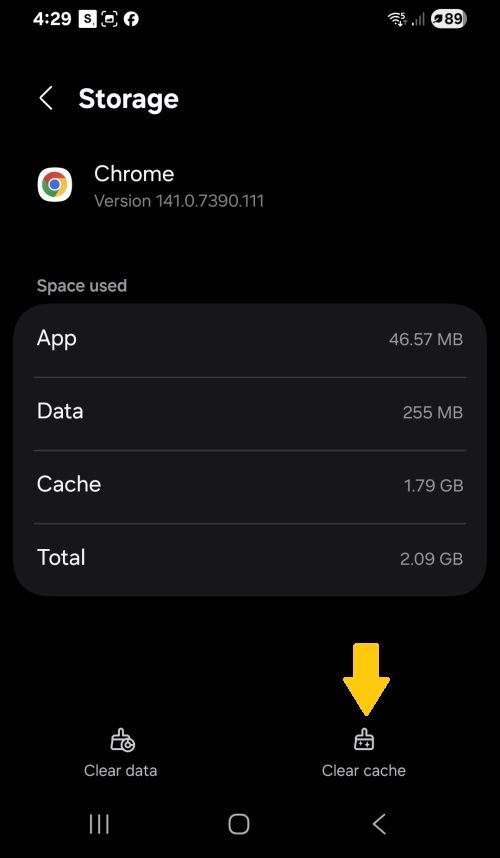 If your phone has under 1 gigabytle of free space, cleaning this cache will give you breathing room. Take note that after a few weeks it will accumulate again. However, I think this 1.79 gigabyte accumulation was from several months. I just asked Google why the Chrome cache gets so large. Here is the answer: "Faster loading: Chrome stores files from websites to load them faster on repeat visits, rather than having to download everything from the server again. Static files: The more you browse, the more images, scripts, and other static content a website downloads and stores as cache. Offline data: Some sites, like Google Search or certain Progressive Web Apps (PWAs), can store data for offline use. Browsing history and cookies: While not part of the cache itself, these are often deleted along with it and also take up storage space. Corrupted data: Occasionally, corrupted data can cause the cache to become unusually large." |
|
4. Videos, audio files and images
If you have been accumulating hundreds of videos and
images over the year, you should be aware that
they take up storage space. This is especially true of the
video files that take up the most space. When you connect the phone and open explorer on your PC, you will see your phone as a separate drive (like "d:" or "e:"). Sometimes you may not see any directories or files. If that happens, disconnect the phone and reconnect and pay attention to see if there is a notification on your phone to allow access to your phone for file transfers. Agree. You will now see a list of folders and files. I tend to "copy" the videos and images to both my pc and a disk-on-key before deleting them from the phone. Check the PC and disk-on-key that the files copied ok. I do not use the "move" files command because if things go bad during a "move" I can lose the files.
Here are some of the directories that have many of
your files: The directories below are related to your Whatsapp app on your phone. Users that are not interested in managing files via their PC, can skip down to the section on Whatsapp's Storage Management. Android --> Media --> com.whatsapp --> WhatsApp --> Media--> WhatsApp Images --> WhatsApp Video --> WhatsApp Audio --> WhatsApp Documents etc... Each of the directories above will also have a "sent" subdirectory. For every video you "sent" in Whatsapp to 10 friends, there may be 10 copies in the sent directory. Now you know where a lot of your storage space is going. If you decide to directly delete any videos via the Internet Explorer and not through Whatsapps own file storage manager (separate section below), when you open the chat of your friend in whatsapp the videos will be greyed out and if you try to play them it will say "missing". Some people may want to track exactly what they sent to each friend. The cost is phone storage. To save hours of reviewing hundreds of images and videos I tend copy the whole directories to my PC and will sort them one day. I copy also to a external disk or disk-on-key because at some point, a few years from now, some of the media will no longer work. Yes, disk-on-keys and other media are not forever media. My opinion: Important documents and media should be kept on at least 2 different media sources. Back to Whatsapp. Settings --> Device Care --> Storage (click on the "storage" word to open manage storage) In the image above you can see that I only have 594 megabytes of images. I copied and deleted hundreds of images and many videos twice this year. If you are active on Whatsapp or you take many photos with your phone's camera, you may have gigabytes of images. Consider spending a few hours a month erasing stuff you do not need or copying them off your phone.
Why do I have over 3 gigabytes of audio files on my phone?
I rarely use the audio in Whatsapp but I have hundreds of
mp3 music files that I copied from my computer to my phone.
I use the free VLC media player on my PC and the
VLC app on my phone. |
|
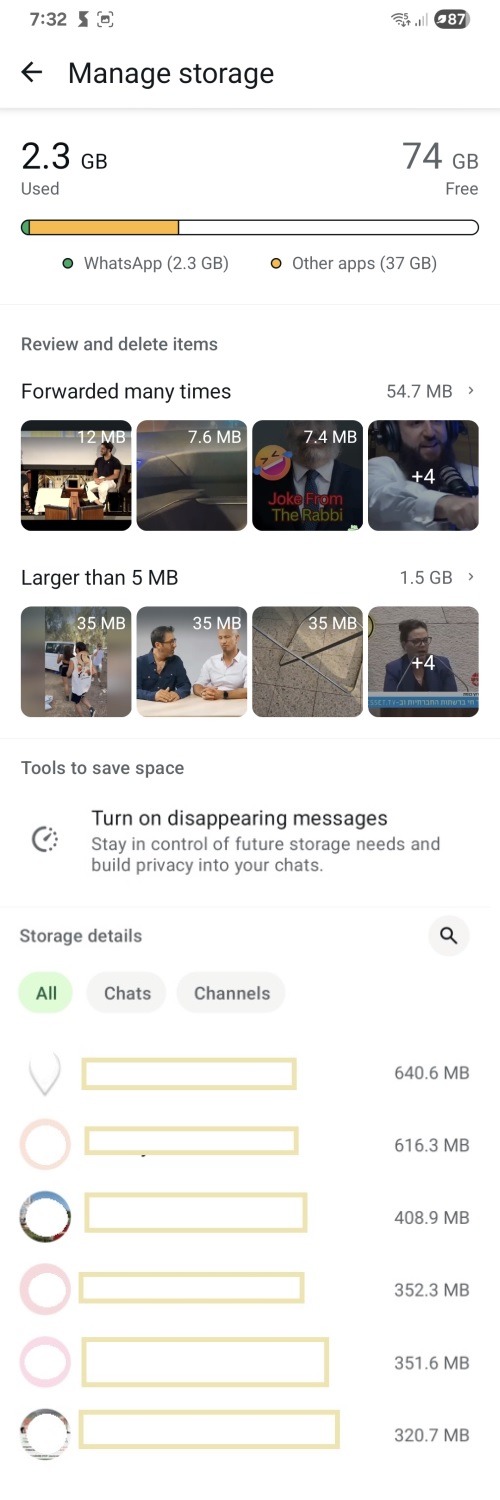
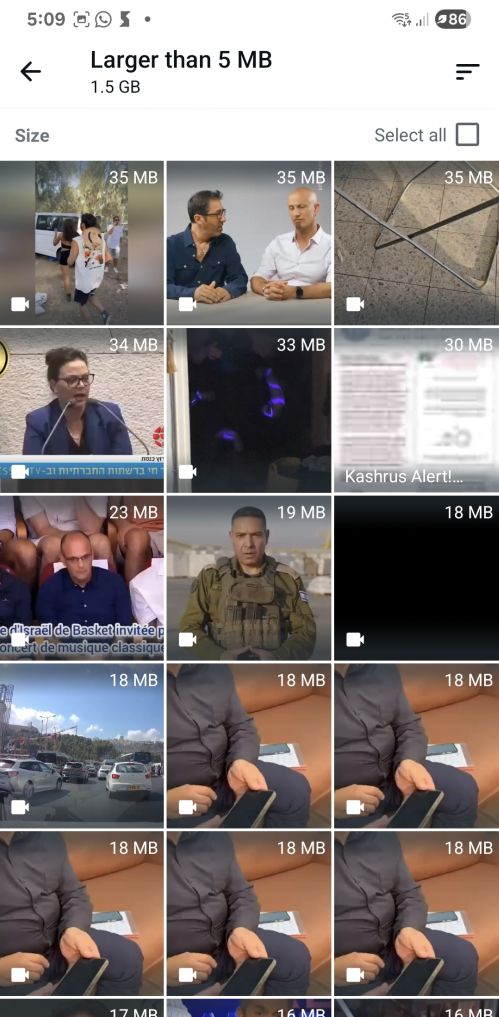
5. Whatsapp Storage Management There are over 3 billion active Whatsapp users in the world who are sending and receiving billions of photos and images every day. Your smartphone, like many others, may have hundreds of photos and videos that take up most of the storage room on your phone. Some of the groups you joined are sending you videos and photos that you do not even want. Do you really need to keep everything from the groups and your past on your phone? If you are automatically backing up to Google every day or week (which is good!), if you exceed the storage limit of 15 gigabytes, you will be asked, for a small yearly fee, if you want to increase your limit. Why not copy the old videos and photos to your pc and/or disk-on-key (in fact make two copies of very important items) and then erase them from your phone. Whatsapp has storage management functions to help you declutter.
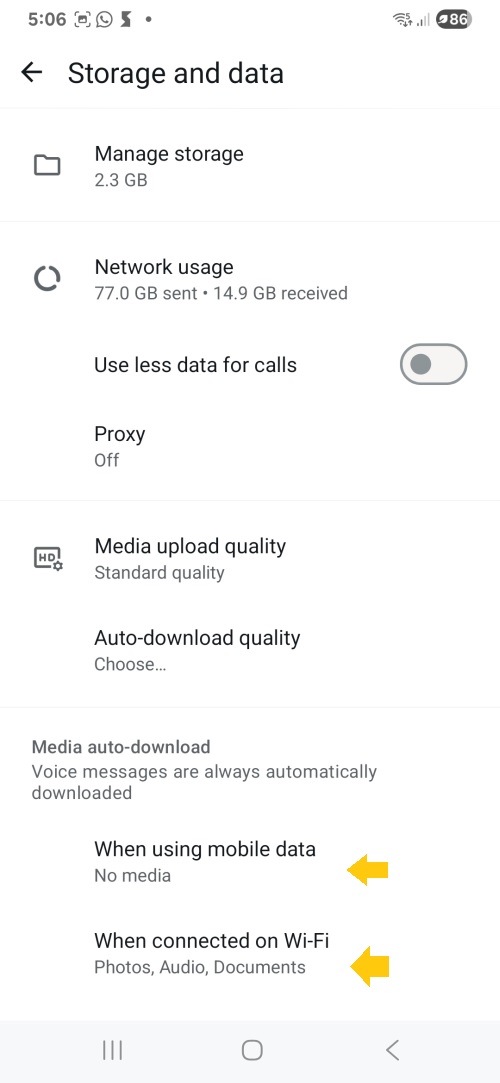
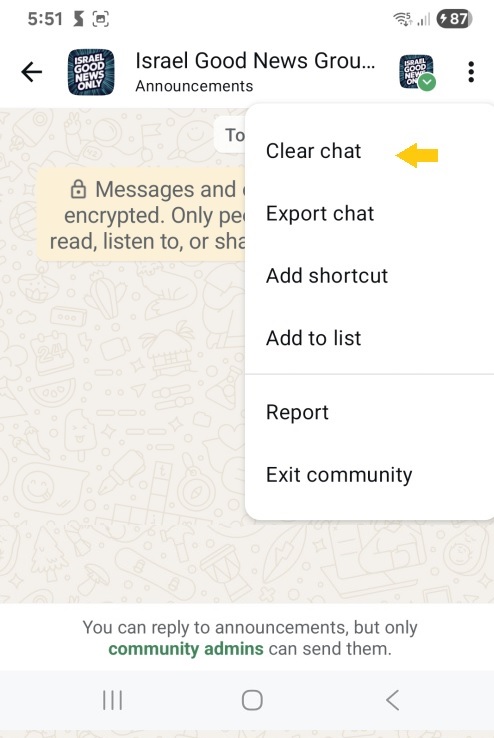
On the main chat menu, click on the top three vertical dots
in the right top corner. As I mentioned before, you may have joined groups that
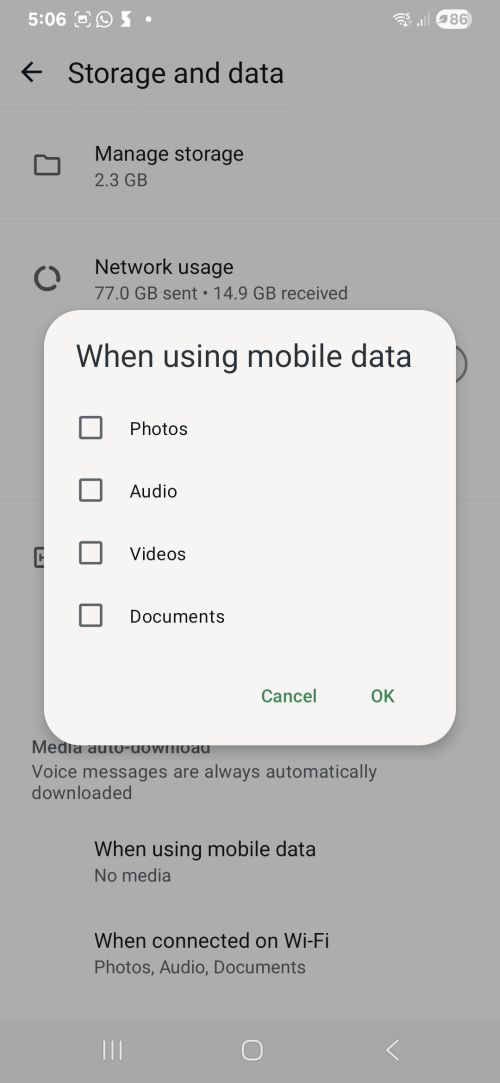
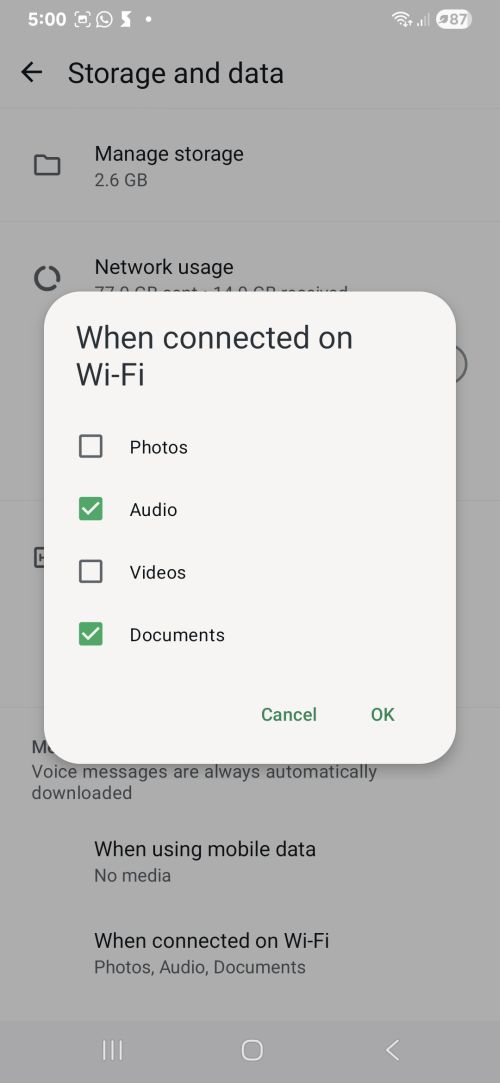
are very active and send out many videos. By default, when
the video is sent to you, it automatically downloads to your
phone even before you view it. You can stop the automatic
downloads when you are using your cellphone provider or Wifi.
These settngs are very important for those living outside of Israel.
In Israel, we pay our cellphone service provider the cheapest
rate in the world for data transfer. It comes out to 2 cents per gigabyte.
The next cheapest is India at 9 cents per gigabyte.
Per Google: The average price for 1GB of mobile data in
the USA is around $2.75 to $6.00.
This is one of the reasons that Whatsapp is so popular in Israel and less
popular in the USA.
One last item about Whatsapp groups. I am on many active
groups that sometimes send up to 20 messages a day.
If I see something interesting, I download the video or image to my phone |
|
6. RAM Plus
OK.....the following paragraph is mostly from Google: My summary: By default your Samsung phone is using part of your phone
storage area as a temporary workspace. It will allow you to have many applications running at the same time
but it will cost you storage space.
If you are short of storage space and you do not mind running
fewer programs at the same time, you can turn off RAM Plus.
Settings --> Device Care --> Memory --> RAM Plus |
Feedback is welcome!
Please share this page with your relatives and friends.
Thank you!
Please Click on the Icons to Share this Page.
Thank You!!
 |
 |
 |
 |
 |
Click to share by email:
Tips to Free Up Phone Storage
 Training Resources
JR Training
Training Resources
JR Training
 JR Links

JR Home
© 2025 Jacob Richman - jr.co.il